> ## Documentation Index
> Fetch the complete documentation index at: https://docs.duitpos.com/llms.txt
> Use this file to discover all available pages before exploring further.
# Dashboard Overview
> A quick tour of the main sections of your dashboard.
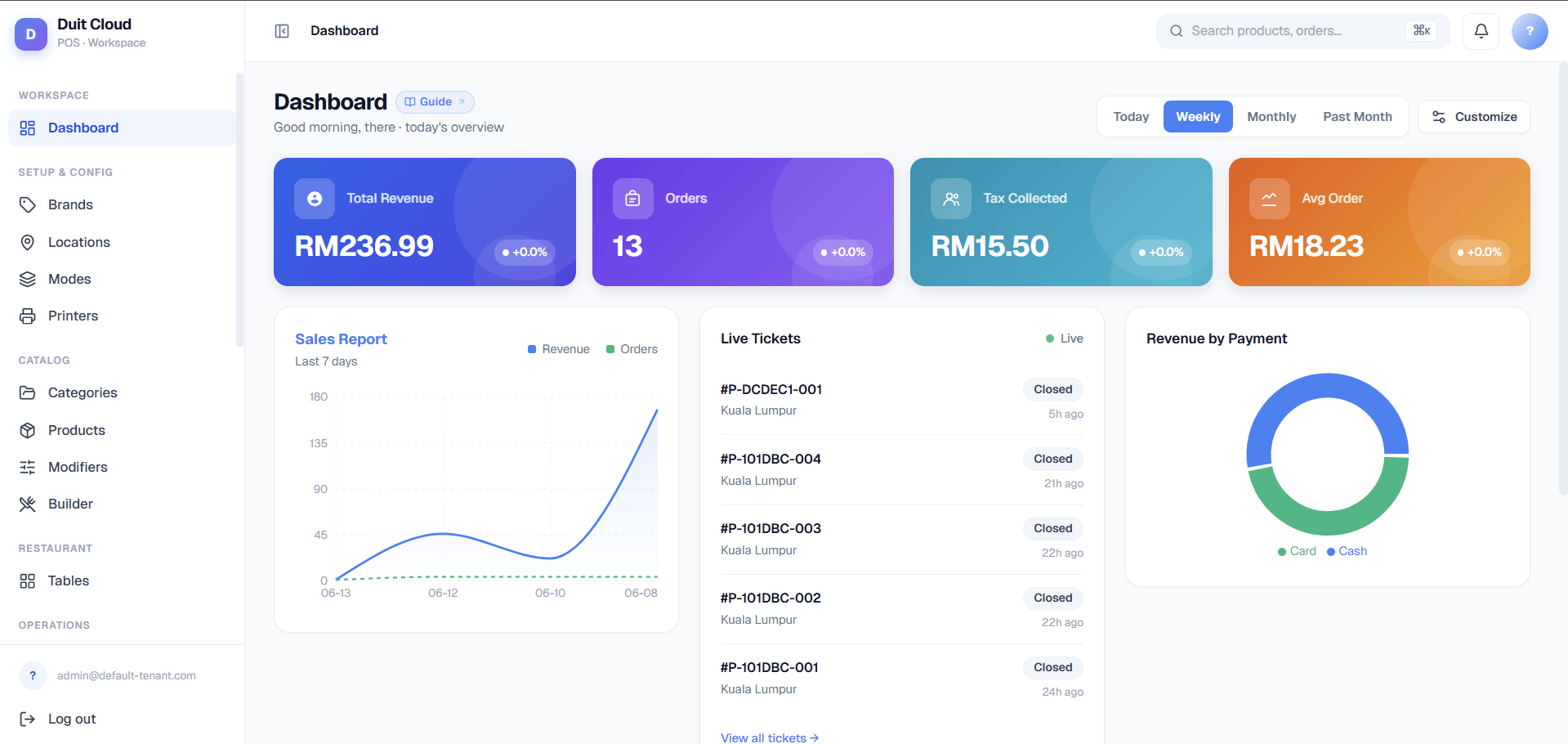
After signing in, you land on the DuitPOS dashboard — the control centre for your entire business. This page explains every section so you can find what you need quickly.
 ## Top Navigation
* **Search** — Find any record quickly across the system. Type a product name, employee, or ticket number.
* **Notifications** — Alerts for important events such as failed payments or import errors.
* **Account menu** — Change your password, switch language, or sign out.
* **Help (?)** — Every page has a **?** icon in the top-right of the page header. Clicking it opens the relevant help article for that page directly.
## Dashboard Sections
| Section | What it does |
| --------------------- | ------------------------------------------------------------------------------------------------------------------------------------------------------ |
| **Manage** | Core configuration: tax rates, payment types, order modes, printers, print templates, transaction types, modifiers, device setups, and global settings |
| **Menu Builder** | Build your menu with categories, products, modifier groups, brands, and bulk pricing overrides |
| **Staff / Employees** | Create employee records with POS PINs, link to user accounts, and track attribution |
| **Reports** | Daily, weekly, and monthly summaries of sales, payments, voids, and tax collected |
| **Workday Reports** | Shift-level breakdowns for cash drawer reconciliation |
| **Online Ordering** | Generate and manage QR codes for table ordering and configure payment processors |
| **E-Invoicing** | Submit and track LHDN MyInvois e-invoices for Malaysian compliance |
| **Users & Roles** | Manage dashboard login accounts and role-based permissions |
## Sidebar Navigation
The sidebar on the left contains all sections grouped by category. Click any section header to expand it. The active page is highlighted.
Pin your most-used sections by clicking the star icon next to them. Pinned sections float to the top of the sidebar for faster access.
## Key Metrics Widget
The top of the dashboard shows today's key numbers at a glance:
* **Total Sales** — gross revenue since midnight.
* **Order Count** — total tickets created today.
* **Average Order Value** — total sales divided by order count.
* **Active Terminals** — how many POS devices are currently logged in.
## Frequently Asked Questions
Click the **DuitPOS logo** in the top-left corner at any time to return to the main dashboard.
Some sections are hidden based on your role permissions. If you need access to a section you cannot see, ask your administrator to update your role under **Users → Roles**.
The main widget area can be reordered by dragging cards. The sidebar order is fixed by section grouping.
Notifications include failed payment alerts, import completion results, and any system messages from your administrator. Click the bell to see all unread notifications.
## Related
Sign in and get oriented
Complete your initial configuration
Sign up for a new account
Control who can see what
## Top Navigation
* **Search** — Find any record quickly across the system. Type a product name, employee, or ticket number.
* **Notifications** — Alerts for important events such as failed payments or import errors.
* **Account menu** — Change your password, switch language, or sign out.
* **Help (?)** — Every page has a **?** icon in the top-right of the page header. Clicking it opens the relevant help article for that page directly.
## Dashboard Sections
| Section | What it does |
| --------------------- | ------------------------------------------------------------------------------------------------------------------------------------------------------ |
| **Manage** | Core configuration: tax rates, payment types, order modes, printers, print templates, transaction types, modifiers, device setups, and global settings |
| **Menu Builder** | Build your menu with categories, products, modifier groups, brands, and bulk pricing overrides |
| **Staff / Employees** | Create employee records with POS PINs, link to user accounts, and track attribution |
| **Reports** | Daily, weekly, and monthly summaries of sales, payments, voids, and tax collected |
| **Workday Reports** | Shift-level breakdowns for cash drawer reconciliation |
| **Online Ordering** | Generate and manage QR codes for table ordering and configure payment processors |
| **E-Invoicing** | Submit and track LHDN MyInvois e-invoices for Malaysian compliance |
| **Users & Roles** | Manage dashboard login accounts and role-based permissions |
## Sidebar Navigation
The sidebar on the left contains all sections grouped by category. Click any section header to expand it. The active page is highlighted.
Pin your most-used sections by clicking the star icon next to them. Pinned sections float to the top of the sidebar for faster access.
## Key Metrics Widget
The top of the dashboard shows today's key numbers at a glance:
* **Total Sales** — gross revenue since midnight.
* **Order Count** — total tickets created today.
* **Average Order Value** — total sales divided by order count.
* **Active Terminals** — how many POS devices are currently logged in.
## Frequently Asked Questions
Click the **DuitPOS logo** in the top-left corner at any time to return to the main dashboard.
Some sections are hidden based on your role permissions. If you need access to a section you cannot see, ask your administrator to update your role under **Users → Roles**.
The main widget area can be reordered by dragging cards. The sidebar order is fixed by section grouping.
Notifications include failed payment alerts, import completion results, and any system messages from your administrator. Click the bell to see all unread notifications.
## Related
Sign in and get oriented
Complete your initial configuration
Sign up for a new account
Control who can see what