> ## Documentation Index
> Fetch the complete documentation index at: https://docs.duitpos.com/llms.txt
> Use this file to discover all available pages before exploring further.
# Permissions
> What each permission controls.
Permissions are grouped by feature area. They are assigned to **roles**, not individual users. Every action in the dashboard is gated by a specific permission — if a user cannot see a page, it means their role does not have the required permission.
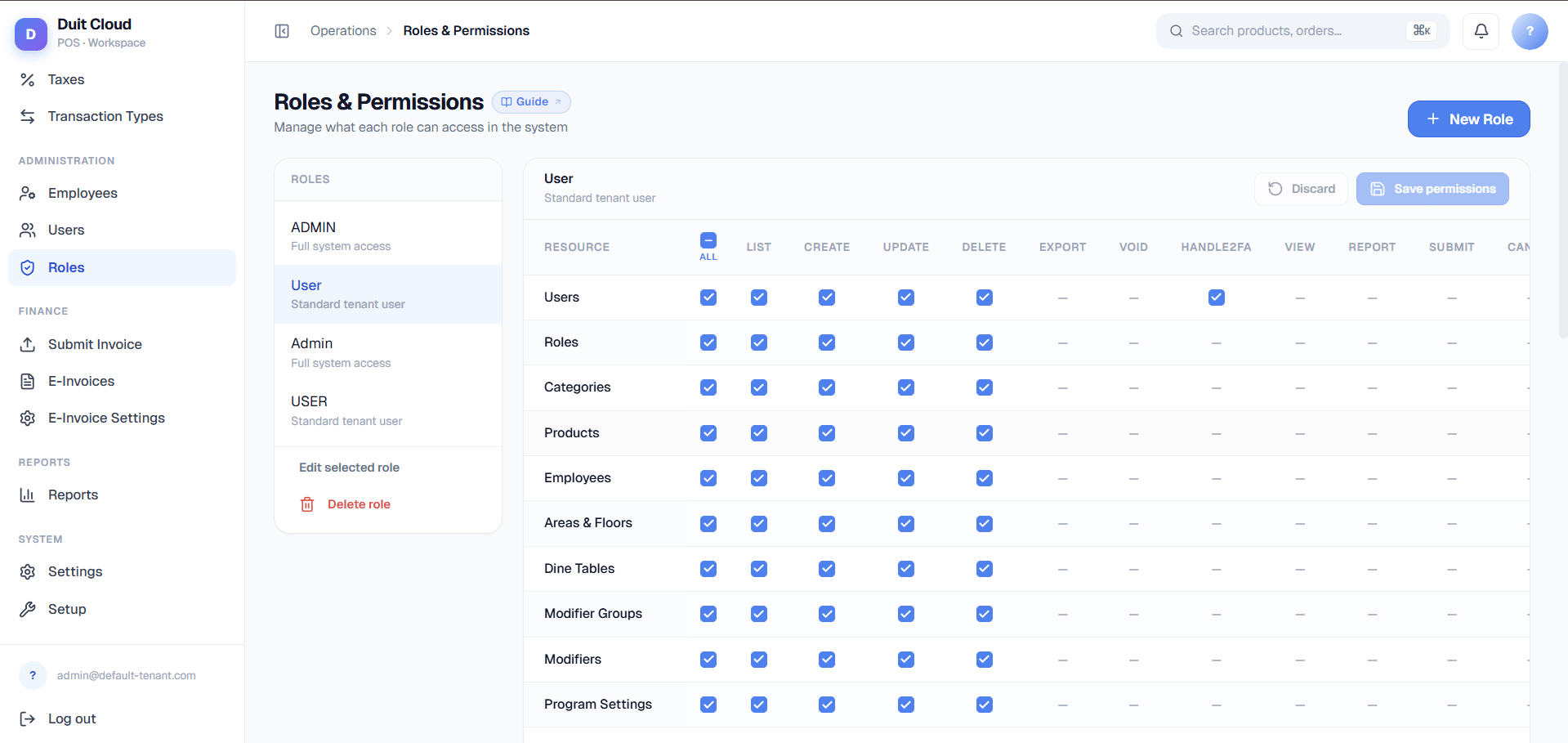 A **Manager** role typically has all permissions. A **Cashier** role typically has no Manage or Users permissions — only what they need to operate the POS terminal.
These permissions are the **building blocks of roles**. To create a new role or assign permissions to a user, see [Users and Roles](/setup/users-and-roles). This page is a reference guide for understanding what each permission controls.
## Permission Groups
### Manage
| Permission | What it allows |
| ---------------------------------------------------------- | --------------------------------------------------------- |
| Payment Types — List | View the payment types list |
| Payment Types — Create | Add new payment types |
| Payment Types — Update | Edit existing payment types and processor config |
| Payment Types — Delete | Remove payment types |
| Tax — List | View tax rates |
| Tax — Create | Add new tax rates |
| Tax — Update | Edit existing tax rates |
| Tax — Delete | Remove tax rates |
| Order Modes — List / Create / Update / Delete | Dine-in, takeaway, delivery mode setup |
| Printer Devices — List / Create / Update / Delete | Physical printer setup (IP, port, paper width) |
| Print Templates — List / Create / Update / Delete | Receipt, kitchen, and label layouts |
| Printer Routing — List / Create / Update / Delete | Rules deciding which printer/template handles which items |
| Transaction Types — List / Create / Update / Delete | Sale, void, refund type configuration |
| Modifier Groups — List / Create / Update / Delete / Export | Modifier groups, including category/product bulk-mapping |
| Modifiers — List / Create / Update / Delete / Export | Individual modifier options within a group |
| Setup — List / Create / Update / Delete | Device profile configuration |
| Settings — View / Update | Global account settings |
| Locations — List / Create / Update / Delete | Branch and outlet management |
### Menu
| Permission | What it allows |
| --------------------------------------------------- | ----------------------------------------------------------------------------------------------- |
| Categories — List / Create / Update / Delete | Menu category management |
| Products — List / Create / Update / Delete / Export | Menu product management |
| Product Overrides — List / Create / Update / Delete | Per-location / per-order-mode price, name, and availability overrides (the "Bulk Pricing" page) |
| Brands — List / Create / Update / Delete | Product brand management |
### Users
| Permission | What it allows |
| --------------------------------------- | ----------------------- |
| Users — List | View staff list |
| Users — Create | Invite new staff |
| Users — Update | Edit profiles and roles |
| Users — Delete | Remove staff accounts |
| Roles — List / Create / Update / Delete | Full role management |
### Staff
| Permission | What it allows |
| ------------------------------------------- | -------------------------- |
| Employees — List / Create / Update / Delete | Employee record management |
### Reports
| Permission | What it allows |
| ---------------------- | ----------------------------------------- |
| Reports — View | Access all report pages |
| Workday Reports — View | Access shift-level reconciliation reports |
| Import History — View | See bulk import logs |
### Online Ordering
| Permission | What it allows |
| --------------------------------- | ------------------------------------ |
| QR — Manage | Configure QR codes and online menu |
| Online Ordering Settings — Update | Set logo, welcome message, and hours |
### E-Invoicing
| Permission | What it allows |
| ----------------------------- | ---------------------------------------------------------------- |
| E-Invoicing — View | Access e-invoice documents |
| E-Invoicing Settings — Update | Configure your business TIN and environment (Sandbox/Production) |
### Platform Admin (Root Users Only)
These permissions only apply to **root admin** accounts and are separate from the tenant role system above — a tenant role can never grant access to these.
| Permission | What it allows |
| -------------------------------------------------- | ------------------------------------------------------------------------------------------------------------------------------------- |
| Tenants — List / Create / Update | View and manage business accounts on the platform |
| Clear Location Sales | Permanently delete tickets, workdays, and e-invoice documents for one location — see [Tenant Operations](/features/tenant-operations) |
| Wipe Tenant | Permanently delete and reseed an entire tenant database — see [Tenant Operations](/features/tenant-operations) |
| Clone Tenant | Create a new tenant by copying an existing one — see [Tenant Operations](/features/tenant-operations) |
| Database Servers — List / Create / Update / Delete | Manage PostgreSQL servers used to host tenants |
| Root Users — List / Create / Update / Delete | Manage platform administrator accounts |
The LHDN intermediary credential and signing-certificate endpoints (see [LHDN Intermediary Setup](/features/lhdn-admin)) are restricted to root accounts but do not have a separate granular permission — **any active root user can access them.** Keep the root user list small (see [Root Users](/features/root-users)).
## How Permissions Work
* Permissions are always assigned to a **role**, never directly to a user.
* A user can have **multiple roles** — they receive the union of all permissions across their roles.
* Removing a permission from a role takes effect immediately for all users with that role. Users currently logged in will lose access on their next page load.
Never grant the **Users — Delete** or **Roles — Delete** permissions to roles unless you fully trust those users. Misuse can remove accounts (including your own admin account) from the system. Always keep at least one active admin user with full access.
## Frequently Asked Questions
Go to **Users → Roles**, open the role assigned to that user, and check whether the required permission (e.g. Reports — View) is toggled on. Save and ask the user to refresh their browser.
Yes. Create a role with only the permissions that feature requires (e.g. only Reports — View) and assign that role to the user.
The change takes effect on the user's next page load or navigation. They will see an "Access Denied" message if they try to access a page the updated role no longer permits.
Not directly on the user page — you need to check each role assigned to the user and combine the permissions. A future update will show a merged permissions view per user.
Start with an existing role that is closest to your use case (e.g. **Manager** for admin, **Cashier** for POS operators). In the [Users and Roles](/setup/users-and-roles) section, duplicate that role and remove or add specific permissions. For example, a **Stock Manager** might copy **Manager** permissions but remove **Users — Delete** and **E-Invoicing** permissions. Test the role with a test account to confirm access is correct.
## Related
Create roles and assign them to users
Destructive root-only actions
Understand what each section does
Fix access issues
A **Manager** role typically has all permissions. A **Cashier** role typically has no Manage or Users permissions — only what they need to operate the POS terminal.
These permissions are the **building blocks of roles**. To create a new role or assign permissions to a user, see [Users and Roles](/setup/users-and-roles). This page is a reference guide for understanding what each permission controls.
## Permission Groups
### Manage
| Permission | What it allows |
| ---------------------------------------------------------- | --------------------------------------------------------- |
| Payment Types — List | View the payment types list |
| Payment Types — Create | Add new payment types |
| Payment Types — Update | Edit existing payment types and processor config |
| Payment Types — Delete | Remove payment types |
| Tax — List | View tax rates |
| Tax — Create | Add new tax rates |
| Tax — Update | Edit existing tax rates |
| Tax — Delete | Remove tax rates |
| Order Modes — List / Create / Update / Delete | Dine-in, takeaway, delivery mode setup |
| Printer Devices — List / Create / Update / Delete | Physical printer setup (IP, port, paper width) |
| Print Templates — List / Create / Update / Delete | Receipt, kitchen, and label layouts |
| Printer Routing — List / Create / Update / Delete | Rules deciding which printer/template handles which items |
| Transaction Types — List / Create / Update / Delete | Sale, void, refund type configuration |
| Modifier Groups — List / Create / Update / Delete / Export | Modifier groups, including category/product bulk-mapping |
| Modifiers — List / Create / Update / Delete / Export | Individual modifier options within a group |
| Setup — List / Create / Update / Delete | Device profile configuration |
| Settings — View / Update | Global account settings |
| Locations — List / Create / Update / Delete | Branch and outlet management |
### Menu
| Permission | What it allows |
| --------------------------------------------------- | ----------------------------------------------------------------------------------------------- |
| Categories — List / Create / Update / Delete | Menu category management |
| Products — List / Create / Update / Delete / Export | Menu product management |
| Product Overrides — List / Create / Update / Delete | Per-location / per-order-mode price, name, and availability overrides (the "Bulk Pricing" page) |
| Brands — List / Create / Update / Delete | Product brand management |
### Users
| Permission | What it allows |
| --------------------------------------- | ----------------------- |
| Users — List | View staff list |
| Users — Create | Invite new staff |
| Users — Update | Edit profiles and roles |
| Users — Delete | Remove staff accounts |
| Roles — List / Create / Update / Delete | Full role management |
### Staff
| Permission | What it allows |
| ------------------------------------------- | -------------------------- |
| Employees — List / Create / Update / Delete | Employee record management |
### Reports
| Permission | What it allows |
| ---------------------- | ----------------------------------------- |
| Reports — View | Access all report pages |
| Workday Reports — View | Access shift-level reconciliation reports |
| Import History — View | See bulk import logs |
### Online Ordering
| Permission | What it allows |
| --------------------------------- | ------------------------------------ |
| QR — Manage | Configure QR codes and online menu |
| Online Ordering Settings — Update | Set logo, welcome message, and hours |
### E-Invoicing
| Permission | What it allows |
| ----------------------------- | ---------------------------------------------------------------- |
| E-Invoicing — View | Access e-invoice documents |
| E-Invoicing Settings — Update | Configure your business TIN and environment (Sandbox/Production) |
### Platform Admin (Root Users Only)
These permissions only apply to **root admin** accounts and are separate from the tenant role system above — a tenant role can never grant access to these.
| Permission | What it allows |
| -------------------------------------------------- | ------------------------------------------------------------------------------------------------------------------------------------- |
| Tenants — List / Create / Update | View and manage business accounts on the platform |
| Clear Location Sales | Permanently delete tickets, workdays, and e-invoice documents for one location — see [Tenant Operations](/features/tenant-operations) |
| Wipe Tenant | Permanently delete and reseed an entire tenant database — see [Tenant Operations](/features/tenant-operations) |
| Clone Tenant | Create a new tenant by copying an existing one — see [Tenant Operations](/features/tenant-operations) |
| Database Servers — List / Create / Update / Delete | Manage PostgreSQL servers used to host tenants |
| Root Users — List / Create / Update / Delete | Manage platform administrator accounts |
The LHDN intermediary credential and signing-certificate endpoints (see [LHDN Intermediary Setup](/features/lhdn-admin)) are restricted to root accounts but do not have a separate granular permission — **any active root user can access them.** Keep the root user list small (see [Root Users](/features/root-users)).
## How Permissions Work
* Permissions are always assigned to a **role**, never directly to a user.
* A user can have **multiple roles** — they receive the union of all permissions across their roles.
* Removing a permission from a role takes effect immediately for all users with that role. Users currently logged in will lose access on their next page load.
Never grant the **Users — Delete** or **Roles — Delete** permissions to roles unless you fully trust those users. Misuse can remove accounts (including your own admin account) from the system. Always keep at least one active admin user with full access.
## Frequently Asked Questions
Go to **Users → Roles**, open the role assigned to that user, and check whether the required permission (e.g. Reports — View) is toggled on. Save and ask the user to refresh their browser.
Yes. Create a role with only the permissions that feature requires (e.g. only Reports — View) and assign that role to the user.
The change takes effect on the user's next page load or navigation. They will see an "Access Denied" message if they try to access a page the updated role no longer permits.
Not directly on the user page — you need to check each role assigned to the user and combine the permissions. A future update will show a merged permissions view per user.
Start with an existing role that is closest to your use case (e.g. **Manager** for admin, **Cashier** for POS operators). In the [Users and Roles](/setup/users-and-roles) section, duplicate that role and remove or add specific permissions. For example, a **Stock Manager** might copy **Manager** permissions but remove **Users — Delete** and **E-Invoicing** permissions. Test the role with a test account to confirm access is correct.
## Related
Create roles and assign them to users
Destructive root-only actions
Understand what each section does
Fix access issues