

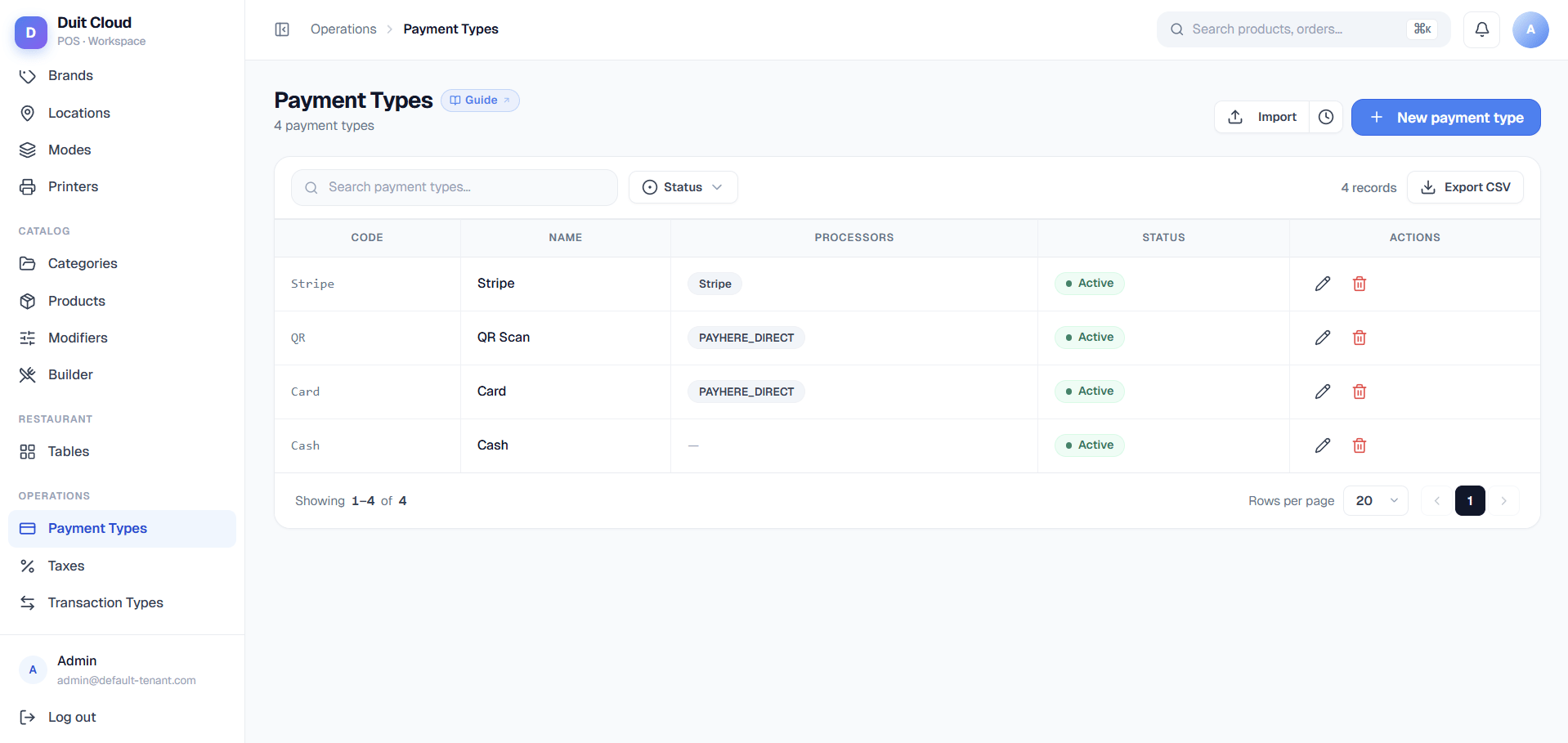
Payment Type Fields
Create a Payment Type
1
Go to Manage → Payment Types
Click Payment Types in the left sidebar under Manage.
2
Click New Payment Type
Fill in the Code, Name, Group Code, Fast Payment, and Active fields.
3
Save
Click Create. The payment type appears in the list immediately and is available on the POS.
Attach a Processor
Processors handle the actual transaction for non-cash payment types. The Add processor dropdown on the edit screen is populated dynamically from the backend — it lists whatever processor types are enabled for your account, so the exact set you see may differ from another tenant’s. Commonly available processors include Stripe, Share Commerce, and Share Commerce ePay — see Two Share Commerce Processors below before picking between the latter two. Each processor you add gets its own configuration panel with whatever fields that processor needs — a mix of text inputs, checkboxes, and dropdowns supplied by the backend. Some processors need no configuration at all, in which case the panel simply reads “No configuration required.”1
Open the edit page
Click the Edit (pencil) icon next to the payment type.
2
Add a processor
In the Processors section, click Add processor, choose one from the dropdown (e.g. Stripe, Share Commerce, or Share Commerce ePay), and it’s added to the list below with its own config panel.
3
Fill in the config panel
Enter whatever fields that processor asks for. For example:
- Stripe: Secret Key and Webhook Secret
- Share Commerce: Terminal IP Address, Terminal Port (default
8890), and Terminal Model (A90 ProorMF919 Pro) - Share Commerce ePay: Merchant ID, Secret Key, and Environment (staging or production)
4
Save
Click Save Processors. The processor is now active for that payment type.
Two Share Commerce Processors
The “Add processor” dropdown lists Share Commerce and Share Commerce ePay as two separate entries, and it’s easy to pick the wrong one since the names look nearly identical. They do very different jobs: Share Commerce = physical countertop card terminal, tap goes here. Share Commerce ePay = online gateway, no device, customer pays from their phone after scanning a QR.
Rule of thumb: customer tapping or inserting a card at the counter → Share Commerce. Customer paying from their own phone after a QR scan → Share Commerce ePay.
Deactivate vs Delete
Frequently Asked Questions
Which payment processors are supported?
Which payment processors are supported?
The list is backend-driven, so it can vary by account, but commonly available processors include:
- Stripe: Credit/debit cards via Stripe Checkout, for online ordering
- Share Commerce: Physical countertop card terminal, for in-person POS payments
- Share Commerce ePay: Online payment gateway, for QR/web ordering
Why is my payment processor not processing payments?
Why is my payment processor not processing payments?
Check these things in order:For Stripe:
- Your Secret Key starts with
sk_live_(production) orsk_test_(testing) — don’t mix them - The Webhook Secret starts with
whsec_and matches exactly what is shown in Stripe Dashboard → Developers → Webhooks → your endpoint → Signing secret - Your payment type is set to Active
- The Terminal IP Address is correct and the terminal is on the same network as your POS
- The Terminal Port matches what’s configured on the device (default
8890) - The Terminal Model selected matches your actual hardware
- Your Merchant ID and Secret Key are correct for the selected Environment (staging vs. production)
- Your merchant account is active and verified at Share Commerce
- Your payment type is set to Active
What is the difference between Cash and Card in the POS?
What is the difference between Cash and Card in the POS?
Cash types do not require a processor — the cashier records the amount received and the system calculates change. Card/online types typically have a processor that handles the transaction electronically. You can create as many types as you need (e.g. separate types for Visa and Amex if you want to track them separately).
Where do I get my Stripe API keys?
Where do I get my Stripe API keys?
Log in to dashboard.stripe.com, go to Developers → API keys. Use the Secret Key (not the Publishable Key). See Stripe Setup for a step-by-step guide.
Related
Stripe Setup
Connect Stripe for online payments
Share Commerce Setup
Connect Share Commerce ePay for QR/online ordering
Settings
Configure general tenant and device settings
Payment Issues
Troubleshoot payment problems