

Workday vs Shift
Two terms, and they mean different things:- A Workday is one Location’s business day as a whole — for example, “Tuesday at the Main Street branch.” It’s the container.
- A Shift is one staff member or till session within that day — for example, “Sarah’s morning shift” or “Register 2’s evening shift.” A Workday can contain several Shifts, and it only closes once every Shift inside it has closed.
Workdays
The primary tab, and a three-level drill-down. Level 1 — Workday list. One row per Location per business date:
Level 2 — Shifts within a workday. Click Open on a workday row to see every Shift inside it:
Alongside the shift list, this level also shows two workday-wide breakdowns: By User (sales attributed to each staff member across all shifts that day) and By Terminal (sales per register across all shifts that day).
Level 3 — Per-shift detail. Click into an individual shift to see its own By User breakdown — useful when a single till session was handled by more than one staff member (a handover mid-shift without formally closing the till, for example).
Shifts
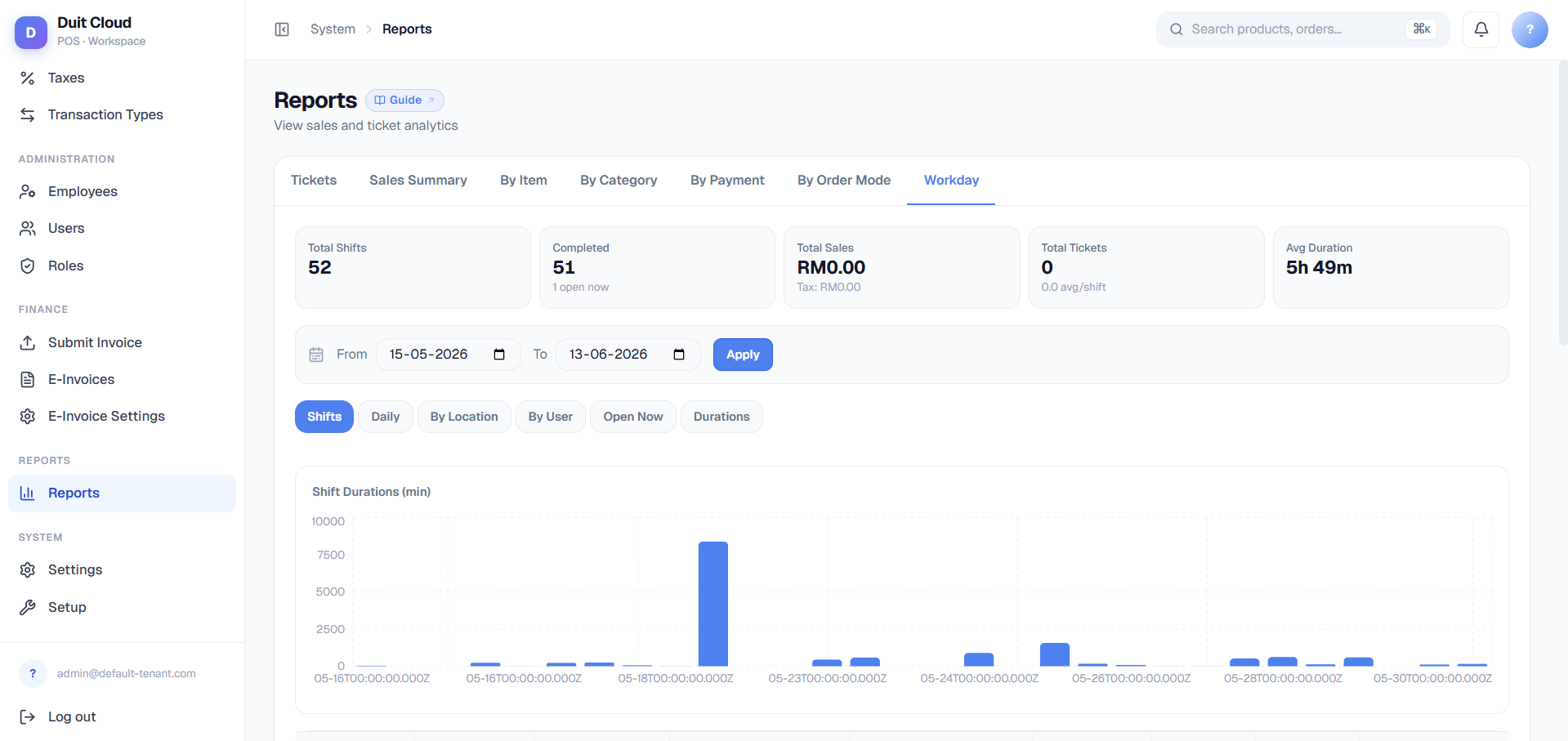
A flat, cross-workday view: a bar chart of shift durations plus a table listing every shift across all workdays in range. Use this when you want to compare shift lengths at a glance rather than drilling through workdays one at a time.Daily
An area chart plotting Sales and Tickets over time, with a supporting daily table underneath. This is the closest Workday Reports gets to the trend view Sales Summary gives you — the difference is that everything here is grouped by workday/business-date rather than calendar date, so it stays accurate for locations that trade past midnight.By Location
Compares Locations against each other — useful once you have more than one site and want to see which is trading strongest, or whether one location’s shifts are consistently running long or short relative to the rest.By User
Compares staff shift performance against each other — sales per shift, shift duration, and ticket counts, side by side across your team.Open Now
A live list of every currently-open shift, across all Locations. There is no date filter here — it always shows the current moment — and it auto-refreshes every 60 seconds.Durations
A scatter chart plotting Duration against Sales for every shift in range. This is the anomaly-spotting view: a shift that ran unusually long but produced unusually low sales stands out visually as an outlier from the rest of the cluster, which can indicate a forgotten open till, a very slow trading period, or a shift that should be looked into more closely — not necessarily a slow night.Investigating a Long-Open Shift
1
Check Open Now
Look for the warning banner and identify which shift(s) have been open more than 8 hours.
2
Confirm it's not still legitimately trading
Check the Location and Start time — an overnight venue may legitimately have a long-running shift; a lunch counter still “open” at midnight almost certainly isn’t.
3
Contact the staff member
Use the Opened By field to identify who needs to close out the till, or have a manager close it on their behalf if they’re unreachable.
4
Review after closing
Once closed, open the shift under the Workdays drill-down to confirm the sales and ticket totals look reasonable for the actual trading window, not the inflated open duration.
Frequently Asked Questions
Why does a Workday still show Status: Open even though I closed my own till?
Why does a Workday still show Status: Open even though I closed my own till?
A Workday only closes once every Shift inside it has closed — if another register or staff member’s till is still open, the Workday stays Open. Drill into the Workday (Level 2) to see which shift is still outstanding.
Why do Workday Reports numbers update faster than the other reports after an offline register reconnects?
Why do Workday Reports numbers update faster than the other reports after an offline register reconnects?
Workday Reports runs on a separate backend service built specifically to reflect offline-synced tickets live, rather than from a cache. Tickets rung up while a register was offline appear here as soon as they sync, without waiting on the aggregation cycle the other eight reports use.
A shift shows a long duration and low sales in the Durations chart — is that always a problem?
A shift shows a long duration and low sales in the Durations chart — is that always a problem?
Not always — a slow trading period can look the same on the chart as a forgotten open till. Cross-check with Open Now (was it flagged for being open too long?) and the shift’s ticket count before assuming it’s an error.
Can I filter Workday Reports by date range like the other reports?
Can I filter Workday Reports by date range like the other reports?
Workdays, Shifts, Daily, By Location, and By User all support date filtering within their own tab. Open Now is the exception — it’s always the current live state and has no date filter by design.
Related
Reports Overview
The “which report do I want” decision table and shared filter/export behavior
Sales Reports
Date-range aggregate sales totals
Tickets & Voids
Look up a specific order or investigate voids, comps, and gifts
Employees
Staff records referenced in Opened By / By User breakdowns