

How a Sale Becomes an E-Invoice
Every e-invoice moves through the same lifecycle, whether it started at the POS or was typed in by hand on Submit Invoice. Understanding this flow before you look at any field on this page is the fastest way to stop being confused by a status you weren’t expecting.1
A ticket closes → a Draft is created automatically
The moment a POS ticket is closed and paid, DuitPOS silently creates a Draft e-invoice behind the scenes and generates a QR code — a “claim link” — that gets printed on the customer’s receipt. You don’t have to do anything for this to happen. That QR code is valid for 24 hours.
2
The customer optionally claims it within 24 hours
If the customer scans the receipt QR, they land on a public page where they fill in their own name, ID, and (optionally) TIN so the invoice can be issued properly to them — as a person or as a business. If they never scan it, the draft just sits there unclaimed; see Consolidation Period for what eventually happens to unclaimed drafts.
3
The invoice gets submitted to LHDN
Submission happens one of two ways: automatically, when the monthly-ish consolidation job bundles up unclaimed drafts (configured per location — see Locations), or manually, right here on this page, by opening a document and clicking Submit to LHDN (or bulk-submitting a whole location’s drafts from that location’s Invoices tab).
4
DuitPOS checks LHDN for a status update every few minutes
Once submitted, a background job polls LHDN roughly every 3 minutes until the document reaches a final state. It flips automatically to Valid (accepted) or Invalid/Rejected — you never need to manually refresh anything to see the outcome.
5
A Valid invoice can be cancelled within 72 hours
If a submitted invoice turns out to be wrong, open it and click Cancel Invoice — you’ll be asked to type a reason first. LHDN only allows cancellation within roughly 72 hours of the original submission; after that window closes, LHDN itself will refuse it and the fix has to go through a formal credit note process instead.
6
Only non-final documents can be permanently deleted
Documents still in Draft, Cancelled, Invalid, or Rejected status can be permanently purged. Anything that reached Submitted or Valid can never be deleted — only cancelled — because LHDN already has a record of it.
Invoice Statuses
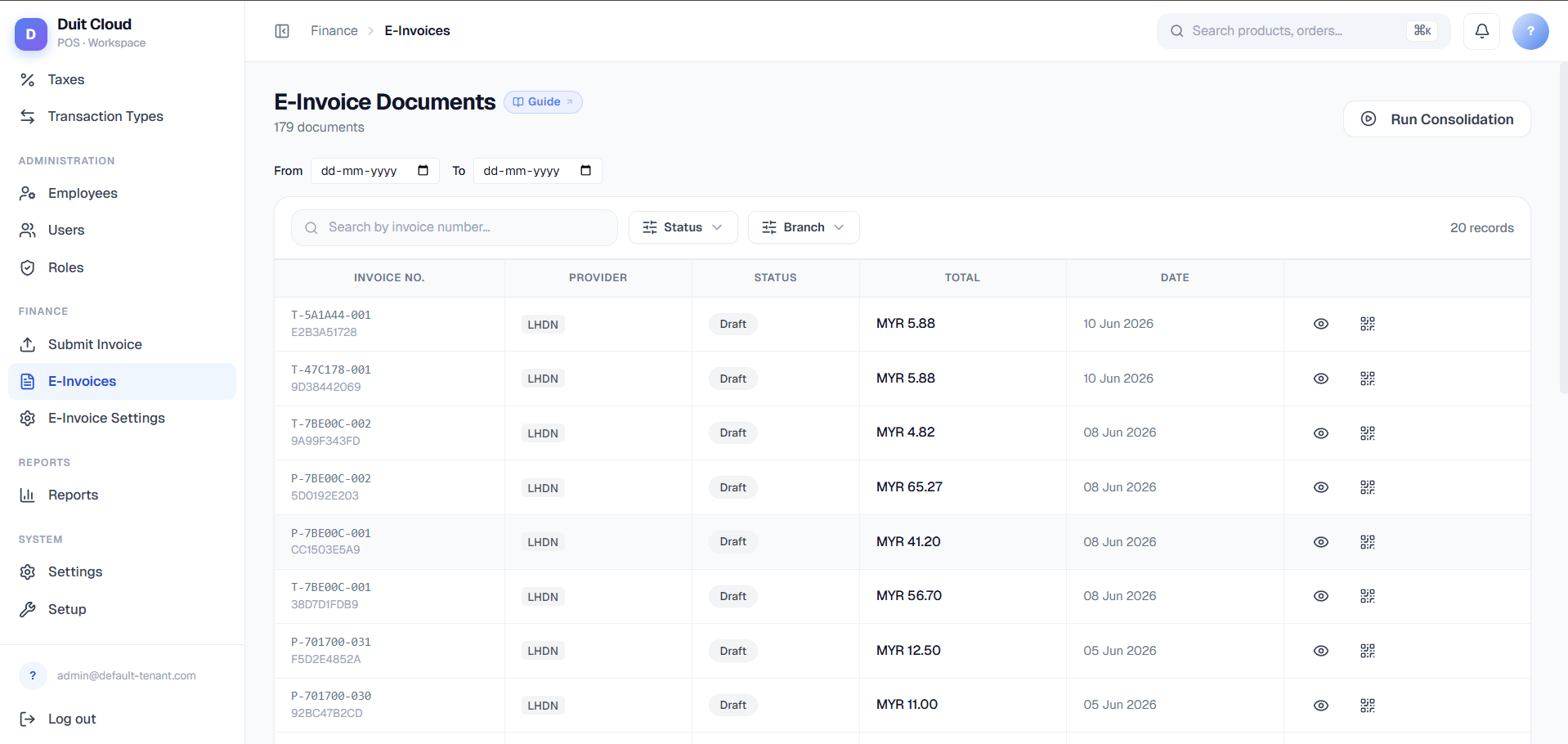
The E-Invoice Documents Screen
Receipt QR Base URL
Run Consolidation
A Run Consolidation button appears at the top of the page, but only if LHDN consolidation is turned on for your tenant. Clicking it triggers the monthly bundling job immediately instead of waiting for its automatic schedule — useful for testing your setup, or for clearing a backlog of unclaimed drafts before month-end without waiting for the scheduled run.Filters
Table columns
Row actions
How Customers Claim Their E-Invoice
This part of the flow is customer-facing and needs no login — but it’s worth understanding here because it’s the main way individual invoices leave Draft status without you doing anything.1
Customer scans the receipt QR
The QR printed on the receipt links straight to a public claim page for that specific invoice.
2
They fill in their own details
The form asks for Nationality (a Malaysian/Foreigner toggle that changes which ID types are offered), Identification Type, Identification No., TIN (optional — leave blank if they don’t have one), Full Name, Mobile Number, Email Address, Address Line 1, City, Postcode, and State.
3
They submit and see a confirmation screen
A “Request Submitted!” confirmation explains that validation typically takes a few minutes and that they can view the finished e-invoice on the MyInvois portal once LHDN accepts it.
Frequently Asked Questions
What if a customer doesn't scan the QR?
What if a customer doesn't scan the QR?
Nothing breaks — the e-invoice just stays in Draft status, unclaimed. Depending on your location’s consolidation setting, it will eventually be bundled into a consolidated invoice automatically, or your staff can manually submit it (or create a fresh invoice for that customer) via Submit Invoice.
Can I cancel an invoice after submitting?
Can I cancel an invoice after submitting?
Yes, but only within LHDN’s cancellation window — roughly 72 hours after the original submission. Open the document detail, click Cancel Invoice, and type a reason. After the window closes, LHDN no longer allows cancellation and the correction has to go through a formal credit note instead.
Why does an invoice show Invalid?
Why does an invoice show Invalid?
Open the document’s detail view — the exact error message and code from LHDN is shown there. Common causes are a missing or malformed TIN, an incorrect MSIC code on the location, or a tax amount that doesn’t reconcile with the line items. Fix the underlying data and resubmit.
What's the difference between Draft and Pending?
What's the difference between Draft and Pending?
Both are pre-submission states. Draft means nobody has claimed it yet — it’s exactly what the POS generated. Pending means the customer scanned the QR and filled in their buyer details, but it hasn’t been sent to LHDN yet. Either one can be submitted manually or picked up by consolidation.
Can I permanently delete an e-invoice?
Can I permanently delete an e-invoice?
Only if it’s in Draft, Cancelled, Invalid, or Rejected status — this is called “purging” and is done from the location’s own Invoices tab, not this global list. Submitted or Valid invoices can never be deleted, only cancelled, because LHDN already has an official record of them.
Related
Submit Invoice
Manually create an e-invoice for a walk-in or B2B customer
Locations
Configure TIN, BRN, MSIC, and consolidation period per location
LHDN Intermediary Setup
Platform-level credentials and signing certificate (root admin)
Tax
Configure the tax rates that appear on invoice line items